
First C# Program

C# can be used in a window-based, web-based, or console application. To start with, we will create a console application to work with C#. 

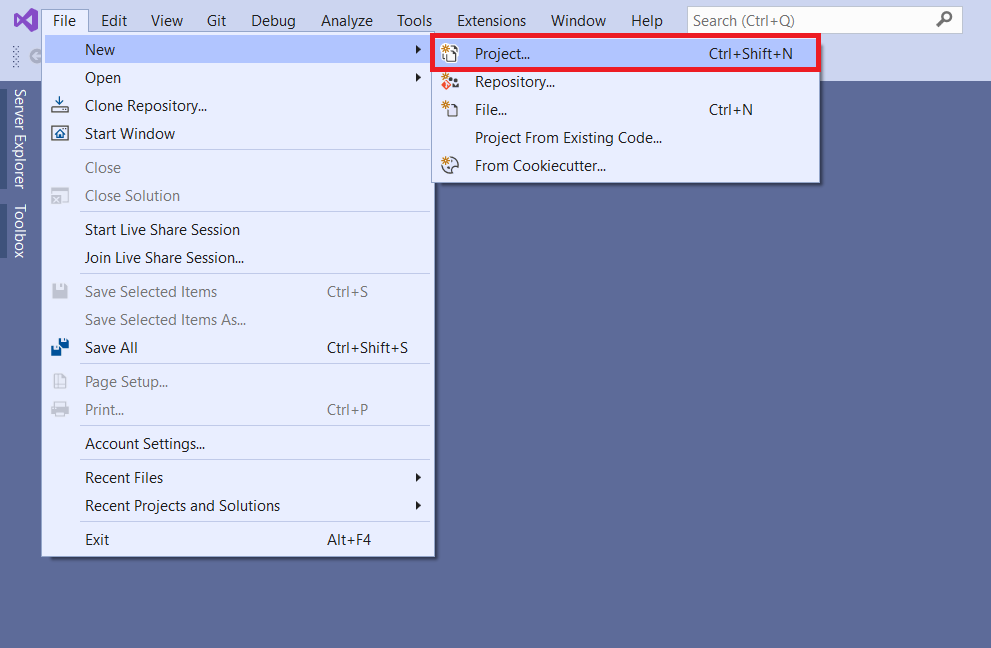
Open Visual Studio (2019 or later) installed on your local machine. Click on File -> New Project... as below


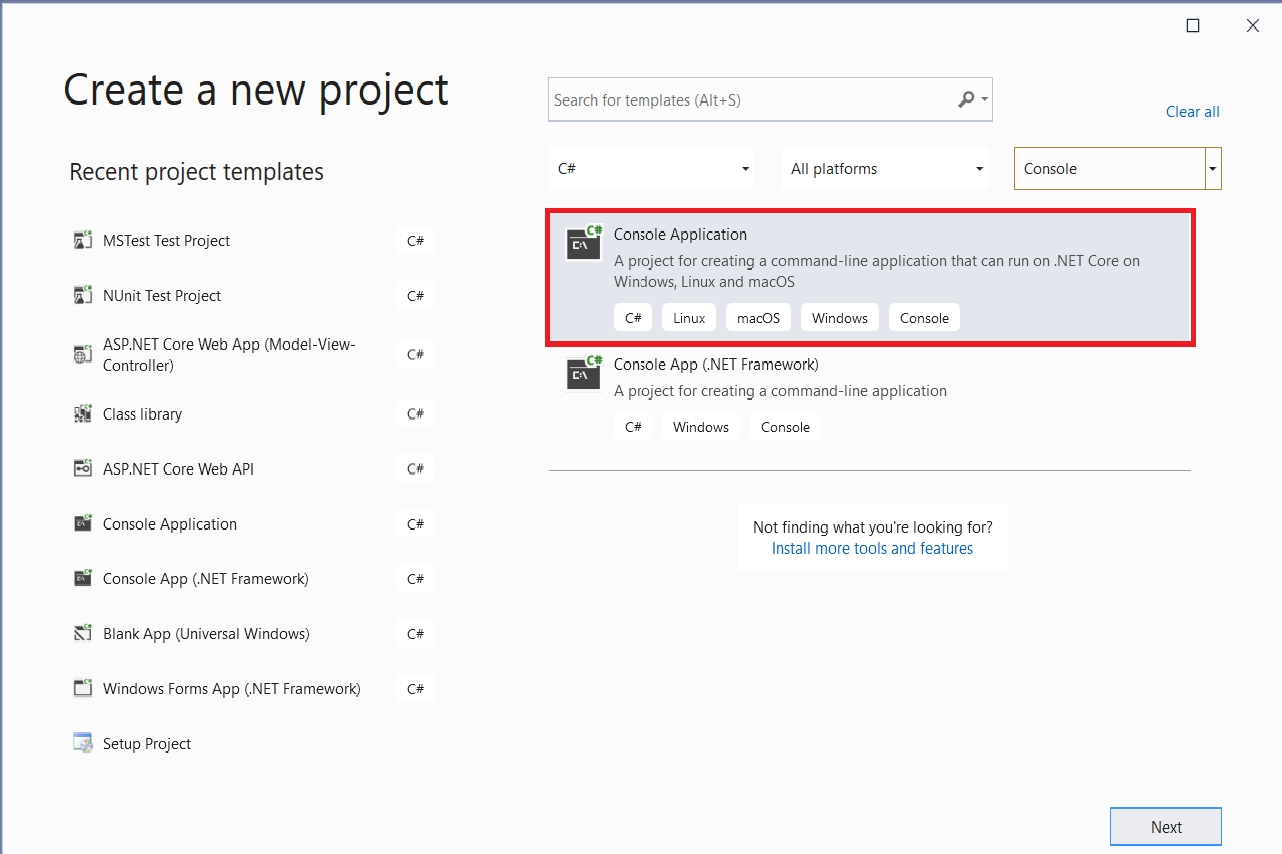
From the New Project popup, select C# in the language menu and select the Console App in the project type menu and click next.
 
 
In the name section, give any appropriate project name, a location where you want to create your project files.
 
Create Your First C# Console App using Visual Studio 2019

 
Click next and select target framework.
 
First EF Core Console Application

Click Create to create the console application.
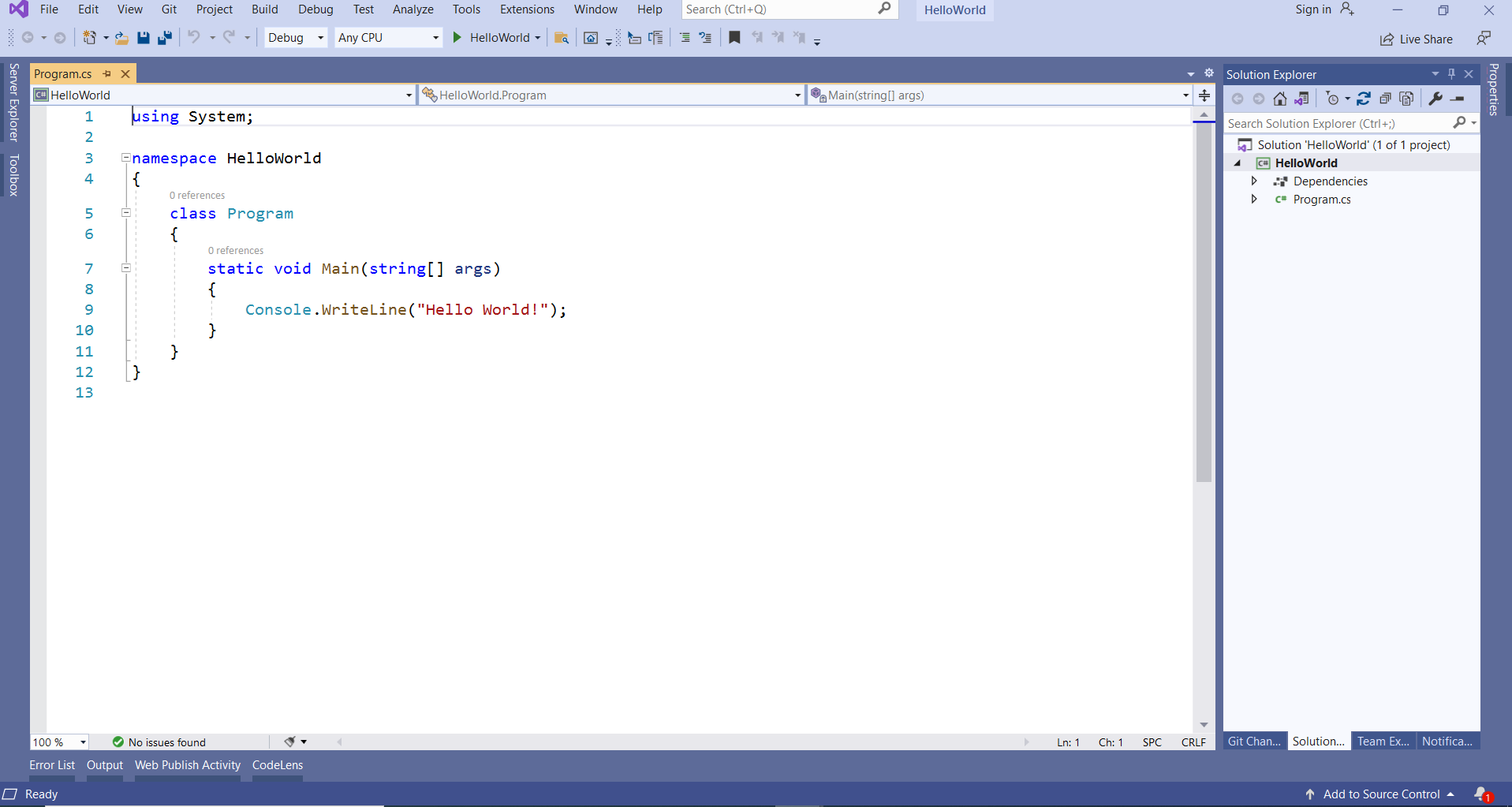
 
C# Hello World: First Console Application Program

Program.cs will be created as default a C# file in Visual Studio where you can write your C# code in Program class, as shown above.
 
To see the output of the above C# program, we have to compile it and run it by pressing Ctrl + F5 or clicking the "HelloWorld" Run button.
 

Comments

Popular posts from this blog

.NET MAUI Tutorial 2026: Build Cross-Platform Apps in C#

Learn .NET MAUI in 2026 to build iOS, Android, Windows & Mac apps from one C# codebase. Start this cross-platform tutorial with code examples today. .NET MAUI (Multi-platform App UI) is Microsoft's framework for building native iOS, Android, Windows, and macOS apps from a single C# codebase . If you've ever wanted to ship a mobile app without learning Swift, Kotlin, and Win32 separately, this .NET MAUI tutorial for 2026 is your starting point. In this guide you'll learn what .NET MAUI is, why it matters for cross-platform app development in C#, and how to build your first working app — with runnable code examples and the best practices senior engineers actually use in production. What Is .NET MAUI and Why Use It in 2026? .NET MAUI is the evolution of Xamarin.Forms, fully integrated into the modern .NET runtime. With one project and one language — C# — you target four platforms. The framework compiles to native UI controls on each device, so a button on iOS...

Angular 14 : 404 error during refresh page after deployment

In this article, We will learn how to solve 404 file or directory not found angular error in production.  Refresh browser angular 404 file or directory not found error You have built an Angular app and created a production build with ng build --prod You deploy it to a production server. Everything works fine until you refresh the page. The app throws The requested URL was not found on this server message (Status code 404 not found). It appears that angular routing not working on the production server when you refresh the page. The error appears on the following scenarios When you type the URL directly in the address bar. When you refresh the page The error appears on all the pages except the root page.   Reason for the requested URL was not found on this server error In a Multi-page web application, every time the application needs to display a page it has to send a request to the web server. You can do that by either typing the URL in the address bar, clicking on the Me...

Angular 14 CRUD Operation with Web API .Net 6.0

How to Perform CRUD Operation Using Angular 14 In this article, we will learn the angular crud (create, read, update, delete) tutorial with ASP.NET Core 6 web API. We will use the SQL Server database and responsive user interface for our Web app, we will use the Bootstrap 5. Let's start step by step. Step 1 - Create Database and Web API First we need to create Employee database in SQL Server and web API to communicate with database. so you can use my previous article CRUD operations in web API using net 6.0 to create web API step by step. As you can see, after creating all the required API and database, our API creation part is completed. Now we have to do the angular part like installing angular CLI, creating angular 14 project, command for building and running angular application...etc. Step 2 - Install Angular CLI Now we have to install angular CLI into our system. If you have already installed angular CLI into your system then skip this step.  To install angular CLI ope...